
Finance operations
9 Best B2B Customer Service Automation Tools for Manufacturers and Distributors in 2026
Compare 9 B2B customer service automation software tools for manufacturers and distributors, from shared inboxes and help desks to AI agents in the ERP.
- Written by
-
 Filip Rejmus
- Published
- Reading time
- 17 min read
The service@ mailbox is full before the first person on the team has logged in. One customer asks where an order is. Another needs a delivery moved up by a week. A third sends photos of a damaged pallet and expects a credit note. A fourth needs a spare part for a machine that shipped nine years ago.
A well-written reply closes none of these. Each one is work: look up the order in the ERP, check the delivery, change the order, open the return, prepare the credit note. The reply is only the last step.
That distinction splits this category. Some tools organize and answer messages: shared inboxes, ticketing, chatbots, reply drafting. Others do the work behind the message, in the ERP. At a manufacturer or distributor, most of what lands in service@ or orders@ is work to do. Several help desks now sell AI agents that act in connected systems, but where a product started still shows what it does best.
This post covers nine tools for B2B customer service automation at manufacturers and distributors in 2026: what each does, who it is built for, and whether it starts from the message or from the work behind it.
Best B2B Customer Service Automation Software at a Glance
| Tool | Best for | Standout |
|---|---|---|
| cloudsquid | Service and order management teams whose shared mailbox is mostly work to do in the ERP | Every message becomes a case with its own agent, worked against the ERP |
| Front | Teams that want a collaborative shared inbox for email, SMS and WhatsApp | Shared inboxes with rules and routing, plus the Autopilot AI agent |
| Zendesk | Service organizations that need ticketing across many channels | AI agents priced on successful outcomes |
| Freshdesk | Teams that want a help desk with AI agents that are quick to launch | Email AI Agent with rollout controls |
| Salesforce Service Cloud | Manufacturers that already run Salesforce as their CRM | Warranties, cases, claims and work orders across the asset lifecycle |
| Microsoft Dynamics 365 Customer Service | Companies standardized on Microsoft Dynamics 365 and Teams | Email-to-case rules, AI-based routing and Copilot |
| Esker | B2B service teams that want inquiries, orders and claims from one vendor | Inquiry management connected to order-to-cash |
| Workist | Inside sales teams at wholesalers and manufacturers that work in Outlook | Inbox Agent that drafts replies in Outlook from ERP data |
| turian | Mid-market manufacturers and wholesalers automating orders and quotes | Order entry, quoting and supplier confirmations with human review |
1. cloudsquid: Autonomous Inbox for the Shared Service Mailbox
Most customer service software is built to get a message to the right person and help that person reply. cloudsquid is built to do the work the message asks for.
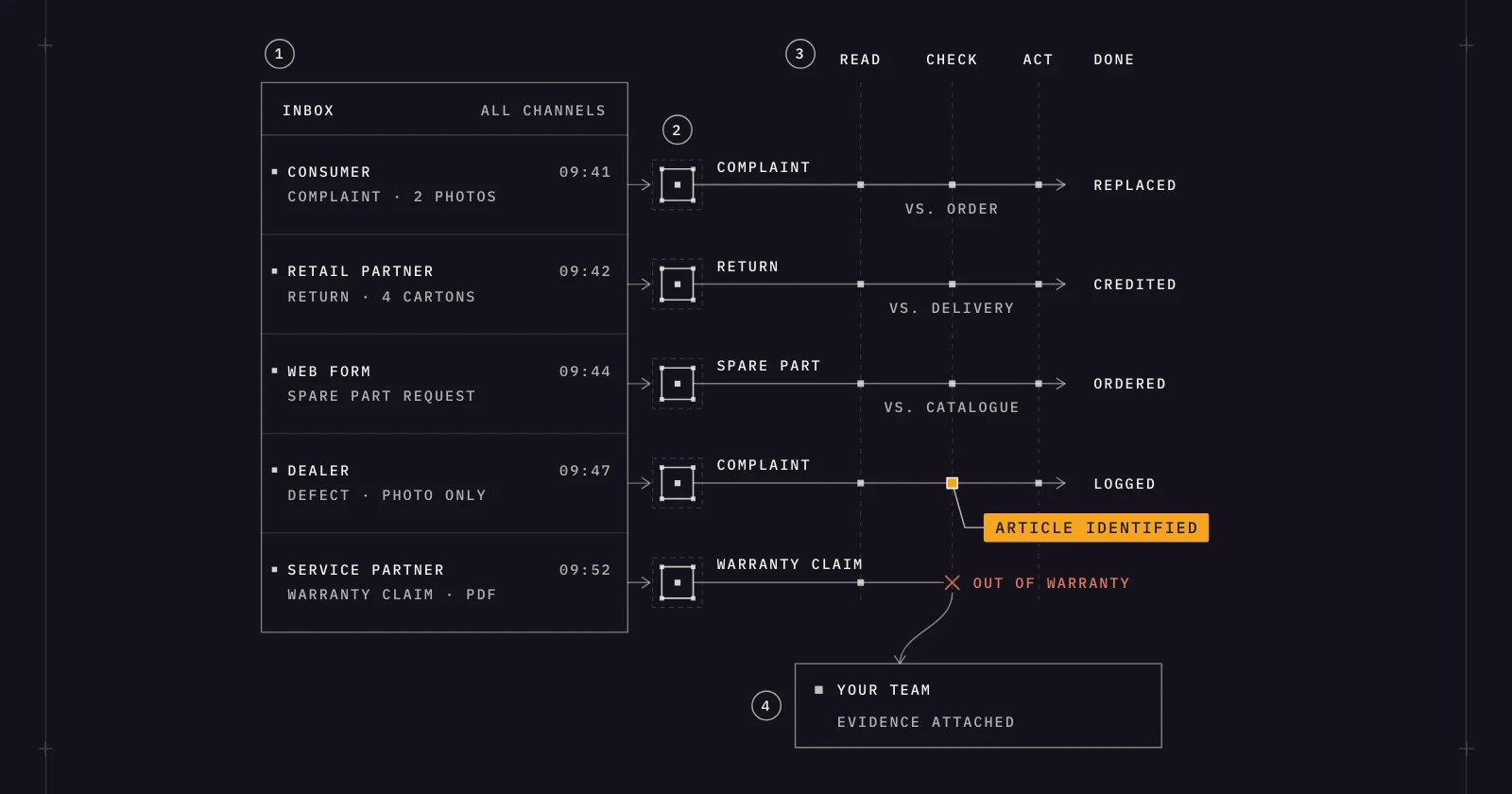
cloudsquid is an autonomous inbox for finance and operations teams at companies that make, move and sell physical products. Every message that lands in the shared service mailbox becomes a case with its own AI agent: an order status request, a delivery date change, a complaint, a return, a spare part request. The agent reads the message, checks it against the company's own records, acts in the ERP and closes the case. Only exceptions reach the team, with the evidence attached.
What makes cloudsquid different for B2B customer service:
Agents learn the process from the company's SOPs, files, email and ERP history. The team sets the rules, approval limits, thresholds and escalation paths, and all of them are versioned and auditable. The team also decides what agents may do alone. Approvals stay with people wherever the team wants them.
People keep working in Outlook, Teams or the cloudsquid workspace, and cloudsquid works on top of the existing ERP (SAP, Oracle NetSuite, Microsoft Dynamics 365, Workday, Infor) instead of replacing it. Every case keeps a full evidence trail. When an agent cannot resolve a case, the team gets it with the evidence, and the resolution becomes a rule so the same exception does not come back.
There is no integration project to start. On day one the team forwards the mailbox and shares SOPs, sample cases and an ERP export. In week one the rules, approval limits and ERP mapping are set up. In week two agents work the inbox. cloudsquid is ISO 27001:2022 certified with EU data residency, and agents run in a secure agent environment.
At Repa, agents run incoming purchase orders end to end, matching customer and item data and escalating only uncertain matches for human review. The same platform covers customer orders and service, returns and claims, so a team can add the next process without buying another tool.
cloudsquid is not a ticketing system and not a contact center. A team that mainly needs phone queues, live chat and a public help center should look at the help desks below.
Who cloudsquid is built for:
Customer service and order management teams at manufacturers and distributors and wholesalers whose shared mailbox is mostly transactions: status requests, date changes, complaints, returns and parts requests that each need a look into the ERP. It fits teams that want this work done under their own rules and approval limits.
2. Front: Shared Inbox Platform With AI for Customer Operations
Front replaces the shared mailbox in Outlook or Gmail with a collaborative workspace. The company states that more than 9,300 businesses use it. Rules route each message to the right person or team, and replies still look like normal email to the customer. Front addresses manufacturers directly and positions the product for quotes, order updates and internal coordination.
Key capabilities:
- Shared inboxes: Works with Microsoft Office 365 (Outlook) and Gmail, with live chat, SMS, WhatsApp and Slack in the same place.
- Rules and routing: A no-code rules engine for routing, tagging, load balancing and escalations.
- Copilot and Topics: Copilot suggests replies from help content and past conversations, and Topics categorizes inbound messages.
- Autopilot: An AI agent that follows Playbooks written in plain language, with the team defining what it handles alone and when it hands off.
Front's standout capability: Team collaboration on customer email
Front's strength is what happens between receiving a message and replying to it: colleagues coordinate on a customer email without forwards and Cc chains. The company says its Autopilot agent takes action in connected systems and resolves up to 70% of requests, and it lists more than 160 out-of-the-box integrations. For ERP transactions, ask which of them reaches your system.
Who Front is built for:
B2B teams where several people and departments share customer communication and the main pain is missed messages, duplicate replies and unclear ownership. It suits companies ready to replace the email client for shared mailboxes.
3. Zendesk: Ticketing Platform With AI Agents Across Channels
Zendesk is a customer service platform built around ticketing. Every request, whether it arrives by email, phone, messaging or social media, becomes a ticket with routing, SLAs, macros and reporting around it. The company states that more than 80,000 companies use it. For manufacturers, Zendesk describes AI agents that manage requests across email, chat and portals, including tracking orders and escalating urgent issues.
Key capabilities:
- Omnichannel routing: Assigns tickets based on agent availability and workload, with skills-based routing on higher plans.
- AI agents: According to Zendesk, they can use APIs, MCP and authorized integrations to retrieve information, update records and trigger workflows in other business systems.
- Copilot: An assistant that brings service reps data such as order histories and technical manuals.
- Marketplace: More than 1,800 apps, partners and integrations, according to the company.
Zendesk's standout capability: AI agents priced on outcomes
Zendesk includes AI agents in every Suite and Support plan and prices them on the successful outcomes they deliver. A request the AI cannot finish is routed to the right human team with its context.
Who Zendesk is built for:
Service organizations that handle many channels, need SLAs, routing, reporting and a knowledge base, and manage their work as tickets. For order changes and credit notes, ask which integration connects Zendesk to your ERP.
4. Freshdesk: Help Desk With Email AI Agents Ready to Launch
Freshdesk is the customer service product of Freshworks. It combines a ticketing help desk with Freddy AI, positioned as a guided path to AI adoption: start with one use case, then expand across teams and channels.
Key capabilities:
- Ticketing and shared inbox: Conversations in one inbox with internal notes and auto-assignment.
- Automations and SLAs: Business rules categorize, prioritize and route tickets, and several SLA policies can run side by side.
- Email AI Agent: Reads each incoming email ticket, can go back and forth with the customer and replies, with rollout controls and spam detection.
- Freddy AI Agent actions: According to Freshworks, the agent connects to backend systems to process refunds, update orders and verify details.
Freshdesk's standout capability: AI agents without a development project
Freshworks emphasizes speed to a first working agent. AI Agent Studio offers ready-to-launch agents, and its Vertical AI Agents come with more than 50 prebuilt agentic workflows. The integrations it names for those workflows are apps such as Shopify, Stripe, PayPal and FedEx. For other systems, Freshworks points to its no-code builder.
Who Freshdesk is built for:
Teams that want a conventional help desk with ticketing, SLAs and a customer portal, and want to try AI on email without a long setup.
5. Salesforce Service Cloud: CRM-Based Service With Manufacturing Workflows
Service Cloud is the customer service product on the Salesforce CRM platform. Agentforce for Service adds AI agents for customer requests and an assistant for service reps.
For manufacturers, Salesforce offers Manufacturing Cloud for Service. The portfolio also grew in 2026: Salesforce announced on September 10 that it had completed its acquisition of Fin, formerly Intercom, whose AI agent works with the help desks companies already use.
Key capabilities:
- Case management: Centrally managed interactions, cases, incidents, knowledge and assets.
- Agentforce for Service: AI agents across voice, web, portals, SMS and WhatsApp that trigger workflows such as managing orders and escalate to a rep with context.
- Manufacturing Cloud for Service: Tracks warranties, cases, work orders and claims throughout the asset lifecycle.
- Integration: MuleSoft Anypoint Platform with hundreds of prebuilt connectors, according to Salesforce.
Salesforce's standout capability: Service tied to the asset and the account
Salesforce's manufacturing offer centers on the product after it ships: warranty programs, claims, work orders and field visits, kept next to the commercial relationship. For a maker of machines or equipment, that puts a complaint in the context of the unit and its warranty.
Who Salesforce Service Cloud is built for:
Manufacturers that already run Salesforce as their CRM and want service, warranty and field service on the same platform. ERP order and delivery data has to be connected, which is the role Salesforce gives MuleSoft.
6. Microsoft Dynamics 365 Customer Service: Case Management on the Microsoft Platform
Dynamics 365 Customer Service is Microsoft's service application. Reps work in a multisession workspace where Copilot helps find information, summarize cases and draft responses. Microsoft has added service agents, among them a Case Management Agent that automates the case lifecycle, and custom agents are built with Copilot Studio.
Key capabilities:
- Email to case: Automatic record creation rules monitor a queue and convert incoming emails into cases.
- AI-based routing: Classifies issues and assigns them to the best-suited service representative.
- Teams collaboration: Brings together experts who resolved similar cases in Microsoft Teams.
- Workflow automation: More than 1,000 prebuilt flows and custom data connectors, according to Microsoft.
Microsoft's standout capability: One platform with the rest of the Microsoft estate
Customer Service interoperates with other business applications on a single platform and uses Teams for collaboration. For a company whose ERP, CRM and collaboration tools already come from Microsoft, the service desk becomes one more application on a platform IT already runs.
Who Microsoft Dynamics 365 Customer Service is built for:
Companies standardized on Microsoft, especially those that already use Dynamics 365 for sales or as their ERP, with an internal team or a partner to configure it.
7. Esker: Customer Inquiry Management Connected to Order-to-Cash
Esker comes from the other direction. Founded in Lyon in 1985 and delisted in 2025 after a tender offer by Bridgepoint and General Atlantic, it sells automation for order-to-cash and source-to-pay processes. Its Customer Service suite combines Customer Inquiry Management, Order Management and Claims Management. Customer Inquiry Management is aimed at B2B customer service teams that work out of shared inboxes today.
Key capabilities:
- Centralized inbox: All customer inquiries on one platform with visibility into volumes, response times and SLAs.
- Classification and sentiment detection: Natural language processing classifies requests and detects urgency and sentiment.
- Suggested answers: Responses generated from business data and a knowledge base, for the rep to review and send in one click.
- ERP and CRM integration: Esker states that its customer service software integrates with the ERP and existing EDI provider to create orders or credit notes, and with the CRM to create cases.
Esker's standout capability: Inquiries linked to orders, claims and receivables
Esker treats an inquiry as part of the order-to-cash process. Inquiry management connects to order management for status, change and delivery questions, to claims and deductions management for disputes, and to credit management and collections. The company states response times up to 80% faster.
Who Esker is built for:
B2B customer service teams that want inquiry handling, order processing and claims from one vendor. Esker states that it integrates with SAP, Oracle, Microsoft and other ERPs.
8. Workist: Inbox Agent for Inside Sales at Wholesalers and Manufacturers
Workist, headquartered in Berlin, describes itself as an agentic AI platform for sales. Its agents capture orders, answer customer inquiries, take orders by phone and handle routine tasks in the ERP.
The Inbox Agent, launched in June 2026, monitors the sales mailbox and sorts each email into categories the team defines. For questions about order status, delivery status or product availability, it searches the ERP and the product database and prepares a draft reply in Outlook for a person to confirm. Orders go to the Order Agent.
Key capabilities:
- Email categorization: Assigns incoming emails to freely definable categories.
- Status research and reply drafts: Researches order status, deliveries, availability, price and product questions in the company's systems and drafts the response.
- Order Agent: Reads orders from email, PDF and Excel, checks every line item against master data and creates the order in the ERP.
- ERP integrations: SAP S/4HANA, SAP ECC, Oracle NetSuite, Microsoft Dynamics 365 Business Central, Sage, proALPHA, ABAS and others, more than 40 systems according to the company.
Workist's standout capability: From inbox to booked order
Together, the Inbox Agent and the Order Agent cover the path from an incoming email to an order in the ERP. Workist states that typically 60 to 90% of orders run fully automatically and that a team member reviews the rest.
Who Workist is built for:
Inside sales and sales back office teams at wholesalers and manufacturers that receive orders and inquiries by email, PDF or phone every day and work in Outlook.
9. turian: AI Agents for Order Entry, Quotes and Supplier Confirmations
turian, also based in Berlin and formerly named Uify, builds AI agents for sales and procurement teams. According to the company, it automates the processing of sales orders, quote requests, bills of quantities and supplier order confirmations for mid-market manufacturers, distributors and wholesalers.
The agents read incoming documents in any format, match them against ERP master data and create structured records that people review and approve. turian also offers AI-generated reply drafts for Outlook and Gmail.
Key capabilities:
- Sales order entry and quoting: Processes orders and quote requests from emails, PDF, Excel and other formats, and can generate quotes or order confirmations.
- Procurement automation: Tracks purchase orders, processes supplier order confirmations and communicates with suppliers.
- Inbox management: Reads, categorizes and distributes emails across inboxes and tells orders and inquiries apart.
- ERP integrations: SAP Business One, SAP S/4HANA, SAP ECC, Microsoft Dynamics 365, Infor LN and M3, proALPHA, Oracle NetSuite, Sage X3 and Odoo, among others.
turian's standout capability: Document work for both sales and procurement
turian covers the customer side (incoming orders and quote requests) and the supplier side (order confirmations and delivery updates). Rule-based policies require user confirmation for sensitive updates. The company states that it is certified to ISO 27001:2022 and hosts its AI models and servers in Europe.
Who turian is built for:
Mid-market manufacturers, distributors and wholesalers whose shared mailbox is dominated by orders, quote requests, tenders and supplier confirmations.
How to Choose the Right B2B Customer Service Automation Software
These nine tools solve different problems. Answer these questions about your own mailbox before comparing vendors.
1. Is your mailbox mostly questions to answer, or work to do?
Pull one week of messages from service@ and sort them. If most can be closed with information that already exists (a manual, a policy, a tracking link), a help desk with a knowledge base fits: Zendesk, Freshdesk or Front. If most require a transaction in the ERP (a changed date, a return, a credit note), look at cloudsquid, Workist, turian and Esker.
2. Which system does the work have to happen in?
For order status and order changes, the system of record is the ERP. Ask each vendor to show the transaction there: the changed delivery date, the return, the credit note. Workist and turian publish lists of supported ERP systems, and Esker states that it creates orders and credit notes through the ERP. Zendesk, Freshdesk, Front and Salesforce describe AI agents that act through APIs and integrations, so ask which integration reaches your ERP and who builds it.
3. Which channels do your customers use?
If phone, live chat and a customer portal matter as much as email, the service platforms fit: Zendesk, Freshdesk, Salesforce Service Cloud and Microsoft Dynamics 365 Customer Service. If nearly everything arrives by email with PDFs attached, an inbox-centered tool covers the volume: cloudsquid, Front, Esker, Workist or turian.
4. What may software do without a person?
Some teams want every reply confirmed by a person, which is how Workist describes its inquiry flow and Esker its one-click responses. Others want routine cases closed without a touch, with people involved only for approvals and exceptions. With cloudsquid the team sets what agents may do alone, with approval limits and escalation paths that are versioned.
5. How much change can the team absorb?
A help desk or shared inbox platform moves the team into a new workspace, which brings structure and reporting but also migration and training. Workist puts drafts into Outlook, turian offers an Outlook add-in, and with cloudsquid people keep working in Outlook or Teams. Companies on Salesforce or Microsoft Dynamics 365 often extend the platform they have.
What Good B2B Customer Service Automation Looks Like in Practice
The difference between answering and doing shows in a single case. A customer writes on Tuesday that the delivery planned for the 14th has to arrive by the 9th.
With a tool that organizes and answers, the message is tagged, assigned and acknowledged within minutes. A rep then opens the ERP, finds the order, checks stock and the transport plan, changes the date and writes back. The handoff got faster. The work took as long as before.
With an agent that does the work, the case arrives already researched: the order found, availability checked, the new date entered or proposed, the confirmation drafted. If the change is within the team's rules, it is done. If it needs a decision, a person gets the case with the evidence.
First response time says little when the customer is waiting for a new delivery date. Time to resolution and the share of cases closed without manual work describe what the customer experiences.
Control matters as much as speed. A good setup shows for every case what was read, what was checked, what was changed in the ERP and who approved it.
Frequently Asked Questions
What is B2B customer service automation software? It is software that takes over repetitive parts of handling requests from business customers: sorting incoming messages, finding the related order, drafting the reply and, in some tools, carrying out the transaction in the ERP. The category ranges from shared inboxes and ticketing systems to AI agents that work a case from start to finish.
How is customer service software for manufacturers different from a standard help desk? A standard help desk is built around conversations and knowledge articles. At a manufacturer or distributor, most requests refer to an order, a delivery, an invoice or a part, and closing them means a transaction in the ERP. That is why customer service automation for distributors and manufacturers depends on ERP access.
What is AI email triage? AI email triage means software reads each incoming message, recognizes what it is (an order, a status request, a complaint, a return) and routes or prioritizes it. Shared mailbox automation and AI email automation for customer service are broader terms that add rules, assignment, drafted replies or completed work. Triage alone shortens the time until someone picks up a message, while the work that follows stays the same.
Does customer service automation work with our ERP? It depends on the tool. Workist and turian publish lists of supported systems that include SAP, Microsoft Dynamics and Oracle NetSuite, and Esker states that it integrates with SAP, Oracle, Microsoft and other ERPs. cloudsquid connects to SAP, Oracle NetSuite, Microsoft Dynamics 365, Workday and Infor. Help desks connect through APIs and app marketplaces, so ask which connector covers the transactions you need.
How long does implementation take? Vendor statements vary with scope. Workist says NetSuite and Business Central customers are usually live in a week and SAP customers in about six weeks, and turian states four to six weeks. cloudsquid is live in two weeks. Projects on Salesforce or Microsoft Dynamics 365 depend on how much is configured and integrated.
What is the ROI of customer service automation? The main drivers are hours no longer spent on lookups and re-keying, faster answers on orders and deliveries, and fewer errors in order changes and credit notes. Measure a baseline first: messages per week by type, minutes per case and the share of cases that need the ERP.
Can AI agents be trusted to change orders or prepare credit notes? Only within rules the team controls. Look for approval limits, a clear definition of what an agent may do alone, a full record of every action and a handoff to a person when a case falls outside the rules. To see how that works on a shared service mailbox, book a demo with cloudsquid.
Related Comparisons
About the author
Co-founder & CPO, Cloudsquid
Filip Rejmus, co-founder and Chief Product Officer at cloudsquid, is building infrastructure to help companies manage, scale, and optimize AI workflows. With a background spanning software engineering, data automation, and product strategy, he bridges the gap between AI research and building useful, friendly Products.Before founding Cloudsquid, Filip worked in engineering and data roles at Taktile, SoundHound, and Uber, and contributed to open-source projects through Google Summer of Code. He studied Computer Science at TU Berlin with additional coursework in Quantitative Finance at TU Delft and Computer Graphics at UC Santa Barbara.
Keep reading
More useful pieces for your team.
Finance operations 17 min read
9 Best Sales Order Automation Software Tools for 2026
Read article
Finance operations 17 min read
9 Best AI Agents for Finance Operations in 2026
Read article
Finance operations 17 min read
9 Best Returns and Warranty Claims Management Software Tools for 2026
Read articleNext step
Automate the workflow behind this article.
Bring your files and business rules. Cloudsquid turns them into an auditable AI workflow in weeks, not quarters.