Accounts Receivable
Pull data from all involved files, such as Invoices, proof of delivery and chargebacks. Reconcile the data across the whole process and automate it entirely. Make data available for anomaly and fraud detection as it comes in.

Upload a PDF, invoice, or email attachment and see it transformed into a structured table in seconds. Extract the exact details you need with AI, then automate everything from cleanup to reconciliation.
01 Overview
Connect your inbox and let emails and attachments flow into your automations. Go from received email to clean data in seconds.
Your files are in Drive or Sharepoint instead? No problem, we got that covered too.
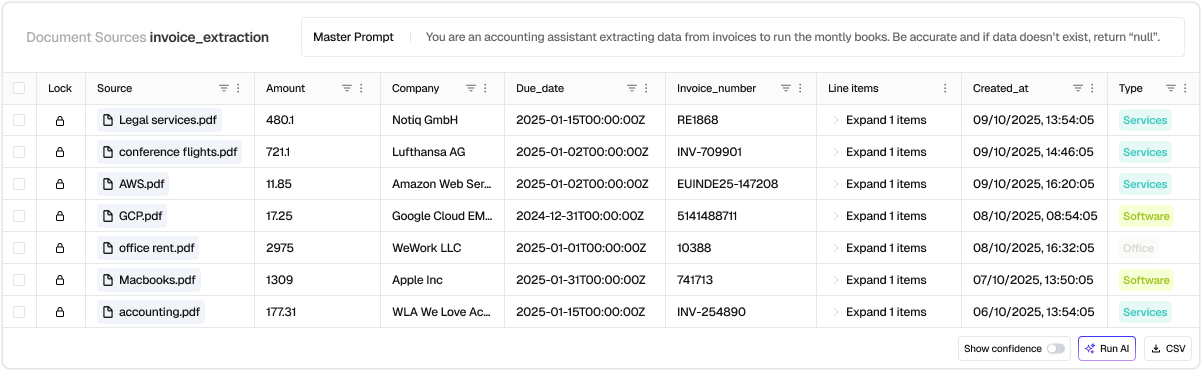
No labeling, machine learning or technical skill required. Simply explain in any language what data you want to extract and the extracted data starts flowing into our table. It doesn't matter if if the files have different formats - just explain what data you need and go from document chaos to quality data in a couple minutes.
Once quality data is extracted, automate everything that follows. Apply business logic, push and reconcile your other systems, and keep your data accurate and up-to-date everywhere. Or just export it into Excel, that works too of course.
Leave your work email and we will show you the workflow on your own documents.
Thank you! Your submission has been received.
Something went wrong while sending the form. Please try again or write to [email protected].
02 Use cases
Pull data from all involved files, such as Invoices, proof of delivery and chargebacks. Reconcile the data across the whole process and automate it entirely. Make data available for anomaly and fraud detection as it comes in.
Automatically forward emails, like from your vendors or logistics partners, into Cloudsquid. Extract data from the email and its attachements, execute additional business logic or enrich with AI reasoning and synchronize your systems
Organize your customer support conversations. Cloudsquid's extraction AI handles attachements like Order documents - but it's also intelligent enough to understand product images, e.g. whether a product is damaged or not. From there easily push the data back into fields in your Customer Support Solution (e.g. Zendesk)
Automatically digitize commercial invoices, packing lists, ISF filings, and other customs documentation.
Structure Data from highly unstructured data like Audio, Video or Image Files.
03 Customers
“We tackled a massive document backlog of over 50,000 PDFs in minutes. After cloudsquid we verify new customers in 1 hour instead of 1 day.”
04 Automate your process
View and understand thousands of files
Manual entry and work in spreadsheets and systems
Multiple days of work and dropped files
Flexibly extract any file type, format, or edge case without custom code
Agentic workflow builder with Python nodes and native warehouse connectors
Scale real-time processing or batch jobs seamlessly
05 Where to start
Hand us a bounded evidence set: ERP export, invoices, statements, contracts. We investigate the full scoped population in an isolated environment. You get quantified, evidence-backed cases: recoverable items, exception patterns, and recurring root causes.
06 Capabilities
07 Further reading
08 Frequently asked questions
Cloudsquid has out of the box integrations with virtually any system. We offer integrations to over 2500 systems and tools. In addition we have the ability to integrate via API, Webhooks and Email - in other words: There's no limit! On top of that we have specialized AI functionality for working with PDF, Excel, Images and other unstructured data, making it very simple to automate these processes.
The best Cloudsquid use cases are recurring processes that involve complex logic and messy data coming from multiple data sources and files. For operations teams, this might be a workflow to automate data entry for order updates coming via Email. For finance, it could be an invoice audit or Purchase Order three-way matching. If it happens in spreadsheets, emails and PDFs, Cloudsquid will help.
Cloudsquid is most commonly used across operations, supply chain, finance, accounting, procurement, and data teams. But any team working with data can work faster with Cloudsquid.
Cloudsquid is purpose built for making workflow automation simple. For that reason you can simply sign up, explain in plain language what you want to automate and have results in a couple minutes. Alternatively you can just reach out to us to work together on a Proof of Concept or get an expert engineer assigned to help you out.
We host in the EU and maintain a strong GDPR posture, with security controls aligned to ISO27001. We can share details during the demo (data flows, controls, and operational modes).
09 See it on your workflow
Bring one process, its real inputs, and the exceptions your team handles today.